Examples
In this section, you will find a variety of examples that demonstrate how to use this library to solve reinforcement learning tasks. With the knowledge and skills you gain from trying these examples, you will be well on your way to using this library to solve your reinforcement learning problems.
Note
It is recommended to use the table of contents in the right sidebar for better navigation.
Gymnasium / Gym
Gymnasium / Gym environments
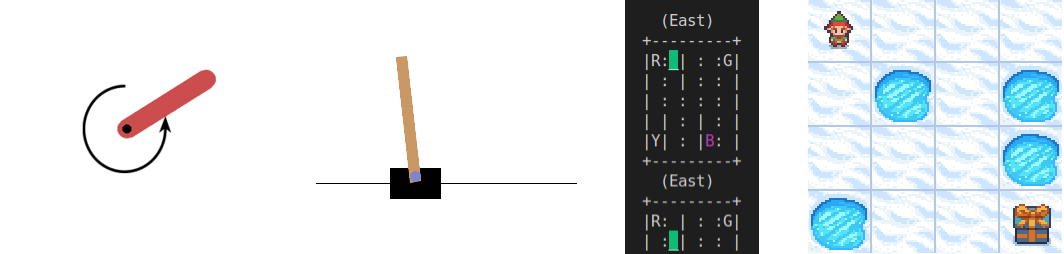
Training/evaluation of agents in Gymnasium / Gym environments (single and vectorized).
Benchmark results are listed in Benchmark results #32 (Gymnasium/Gym).
The scripts define and parse the following command line arguments:
--num_envs: Number of environments. Default: 1.--headless: Run in headless mode (no rendering). Default: False.--seed: Random seed. Default: None.--checkpoint: Load checkpoint from path. Default: None.--eval: Run in evaluation mode (logging/checkpointing disabled). Default: False.
Environment |
Script |
Checkpoint (Hugging Face) |
|---|---|---|
CartPole |
||
FrozenLake |
||
Pendulum |
|
|
PendulumNoVel*
|
|
|
Taxi |
Environment |
Script |
Checkpoint (Hugging Face) |
|---|---|---|
CartPole |
|
|
FrozenLake |
||
Pendulum |
|
|
PendulumNoVel*
|
|
|
Taxi |
Note
(*) The examples use a wrapper around the original environment to mask the velocity in the observation. The intention is to make the MDP partially observable and to show the capabilities of recurrent neural networks.
Environment |
Script |
Checkpoint (Hugging Face) |
|---|---|---|
CartPole |
||
FrozenLake |
||
Pendulum |
|
|
PendulumNoVel*
|
|
|
Taxi |
Note
(*) The examples use a wrapper around the original environment to mask the velocity in the observation. The intention is to make the MDP partially observable and to show the capabilities of recurrent neural networks.
Shimmy (API conversion)
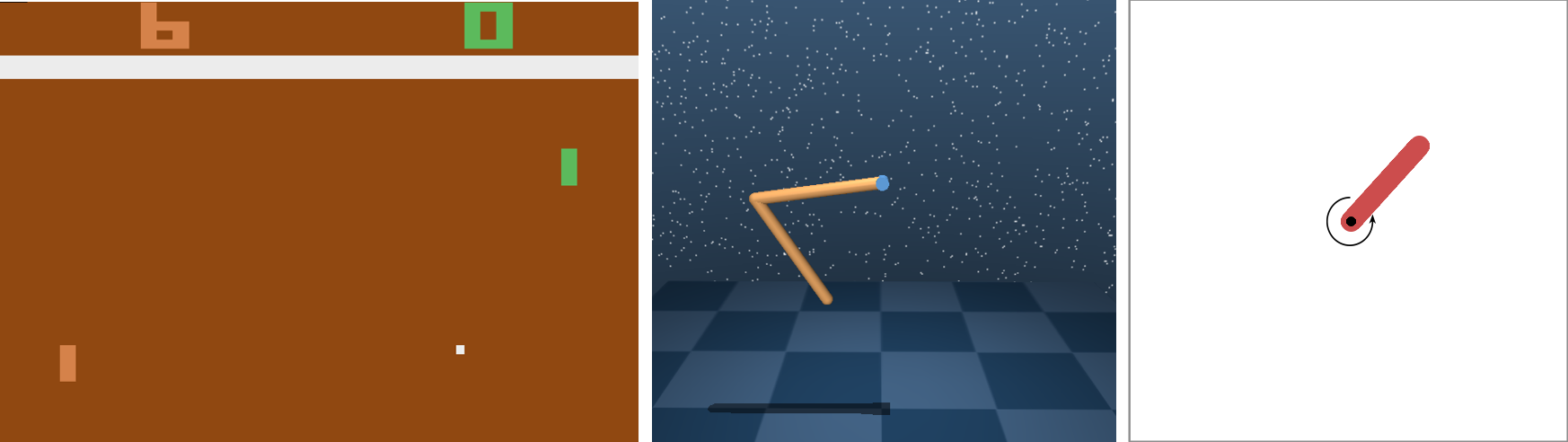
The following examples show the training in several popular environments (Atari, DeepMind Control and OpenAI Gym) that have been converted to the Gymnasium API using the Shimmy (API conversion tool) package.
Note
From skrl, no extra implementation is necessary, since it fully supports Gymnasium API.
Note
Because the Gymnasium API requires that the rendering mode be specified during the initialization of the environment,
it is not enough to set the headless option in the trainer configuration to render the environment.
In this case, it is necessary to call the gymnasium.make function using render_mode="human"
or any other supported option.
The scripts define and parse the following command line arguments:
--num_envs: Number of environments. Default: 1.--headless: Run in headless mode (no rendering). Default: False.--seed: Random seed. Default: None.--checkpoint: Load checkpoint from path. Default: None.--eval: Run in evaluation mode (logging/checkpointing disabled). Default: False.
Environment |
Script |
Checkpoint (Hugging Face) |
|---|---|---|
Atari: Pong |
||
DeepMind: Acrobot |
||
Gym-v21 compatibility |
Environment |
Script |
Checkpoint (Hugging Face) |
|---|---|---|
Atari: Pong |
||
DeepMind: Acrobot |
||
Gym-v21 compatibility |
ManiSkill
Training/evaluation of agents in ManiSkill environments.
The scripts define and parse the following command line arguments:
--num_envs: Number of environments. Default: 1.--headless: Run in headless mode (no rendering). Default: False.--seed: Random seed. Default: None.--checkpoint: Load checkpoint from path. Default: None.--eval: Run in evaluation mode (logging/checkpointing disabled). Default: False.
Environment |
Script |
Checkpoint (Hugging Face) |
|---|---|---|
PushCube |
Environment |
Script |
Checkpoint (Hugging Face) |
|---|---|---|
PushCube |
Environment |
Script |
Checkpoint (Hugging Face) |
|---|---|---|
PushCube |
MuJoCo Playground
Training/evaluation of agents in MuJoCo Playground environments.
The load_playground_env() loader function defines the following command line arguments:
--task: Name of the task.--num_envs: Number of environments to simulate.--seed: Random seed.--episode_length: Length of the episode.--action_repeat: Number of times to repeat the given action per step.--full_reset: Whether to perform a full reset of the environment on each step, rather than resetting to an initial cached state. Default: False.--randomization: Whether to use randomization. Default: False.--vision: Whether to use vision-based environment. Default: False.
While the scripts add additional command line arguments to the parser, such as:
--headless: Run in headless mode (no rendering). Default: False.--checkpoint: Load checkpoint from path. Default: None.--eval: Run in evaluation mode (logging/checkpointing disabled). Default: False.
Environment |
Script |
Checkpoint (Hugging Face) |
|---|---|---|
CartpoleBalance |
Environment |
Script |
Checkpoint (Hugging Face) |
|---|---|---|
CartpoleBalance |
Environment |
Script |
Checkpoint (Hugging Face) |
|---|---|---|
CartpoleBalance |
NVIDIA Isaac Lab
Training/evaluation of agents in Isaac Lab environments.

Benchmark results are listed in Benchmark results #32 (NVIDIA Isaac Lab).
The load_isaaclab_env() loader function defines the following command line arguments:
--task: Name of the task.--num_envs: Number of environments.--seed: Random seed.--disable_fabric: Disable fabric and use USD I/O operations. Default: False.--distributed: Run training with multiple GPUs or nodes. Default: False.
While the scripts add additional command line arguments to the parser, such as:
--checkpoint: Load checkpoint from path. Default: None.--eval: Run in evaluation mode (logging/checkpointing disabled). Default: False.
Note
Isaac Lab environments implement a functionality to get their configuration from the command line.
Because of this feature, setting the headless option from the trainer configuration will not work.
In this case, it is necessary to invoke the scripts as follows: isaaclab -p script.py --headless.
Environment |
Script |
Checkpoint (Hugging Face) |
|---|---|---|
Isaac-Ant-Direct-v0 |
|
|
Isaac-Cartpole-Showcase-Box-Box-Direct-v0
|
|
Environment |
Script |
Checkpoint (Hugging Face) |
|---|---|---|
Isaac-Ant-Direct-v0 |
|
|
Isaac-Cartpole-Showcase-Box-Box-Direct-v0
|
Environment |
Script |
Checkpoint (Hugging Face) |
|---|---|---|
Isaac-Ant-Direct-v0 |
||
Isaac-Cartpole-Showcase-Box-Box-Direct-v0
|
Real-world examples
These examples show basic real-world and sim2real use cases to guide and support advanced RL implementations
3D reaching task (Franka’s gripper must reach a certain target point in space). The training was done in Omniverse Isaac Gym. The real robot control is performed through the Python API of a modified version of frankx (see frankx’s pull request #44), a high-level motion library around libfranka. Training and evaluation is performed for both Cartesian and joint control space
Implementation (see details in the table below):
The observation space is composed of the episode’s normalized progress, the robot joints’ normalized positions (\(q\)) in the interval -1 to 1, the robot joints’ velocities (\(\dot{q}\)) affected by a random uniform scale for generalization, and the target’s position in space (\(target_{_{XYZ}}\)) with respect to the robot’s base
The action space, bounded in the range -1 to 1, consists of the following. For the joint control it’s robot joints’ position scaled change. For the Cartesian control it’s the end-effector’s position (\(ee_{_{XYZ}}\)) scaled change. The end-effector position frame corresponds to the point where the left finger connects to the gripper base in simulation, whereas in the real world it corresponds to the end of the fingers. The gripper fingers remain closed all the time in both cases
The instantaneous reward is the negative value of the Euclidean distance (\(\text{d}\)) between the robot end-effector and the target point position. The episode terminates when this distance is less than 0.035 meters in simulation (0.075 meters in real-world) or when the defined maximum timestep is reached
The target position lies within a rectangular cuboid of dimensions 0.5 x 0.5 x 0.2 meters centered at (0.5, 0.0, 0.2) meters with respect to the robot’s base. The robot joints’ positions are drawn from an initial configuration [0º, -45º, 0º, -135º, 0º, 90º, 45º] modified with uniform random values between -7º and 7º approximately
Variable |
Formula / value |
Size |
|---|---|---|
Observation space |
\(\dfrac{t}{t_{max}},\; 2 \dfrac{q - q_{min}}{q_{max} - q_{min}} - 1,\; 0.1\,\dot{q}\,U(0.5,1.5),\; target_{_{XYZ}}\) |
18 |
Action space (joint) |
\(\dfrac{2.5}{120} \, \Delta q\) |
7 |
Action space (Cartesian) |
\(\dfrac{1}{100} \, \Delta ee_{_{XYZ}}\) |
3 |
Reward |
\(-\text{d}(ee_{_{XYZ}},\; target_{_{XYZ}})\) |
|
Episode termination |
\(\text{d}(ee_{_{XYZ}},\; target_{_{XYZ}}) \le 0.035 \quad\) or \(\quad t \ge t_{max} - 1\) |
|
Maximum timesteps (\(t_{max}\)) |
100 |
Workflows:
Warning
Make sure you have the e-stop on hand in case something goes wrong in the run. Control via RL can be dangerous and unsafe for both the operator and the robot
Target position in X and Y obtained with a USB-camera (position in Z fixed at 0.2 m)
Prerequisites:
A physical Franka Emika Panda robot with Franka Control Interface (FCI) is required. Additionally, the frankx library must be available in the python environment (see frankx’s pull request #44 for the RL-compatible version installation)
Files
Environment:
reaching_franka_real_env.pyEvaluation script:
reaching_franka_real_skrl_eval.pyCheckpoints (
agent_joint.pt,agent_cartesian.pt):trained_checkpoints.zip
Evaluation:
python3 reaching_franka_real_skrl_eval.py
Main environment configuration:
Note
In the joint control space the final control of the robot is performed through the Cartesian pose (forward kinematics from specified values for the joints)
The control space (Cartesian or joint), the robot motion type (waypoint or impedance) and the target position acquisition (command prompt / automatically generated or USB-camera) can be specified in the environment class constructor (from reaching_franka_real_skrl_eval.py) as follow:
control_space = "joint"   # joint or cartesian
motion_type = "waypoint"  # waypoint or impedance
camera_tracking = False   # True for USB-camera tracking

Prerequisites:
All installation steps described in Omniverse Isaac Gym’s Installation section must be fulfilled
Files (the implementation is self-contained so no specific location is required):
Environment:
reaching_franka_omniverse_isaacgym_env.pyTraining script:
reaching_franka_omniverse_isaacgym_skrl_train.pyEvaluation script:
reaching_franka_omniverse_isaacgym_skrl_eval.pyCheckpoints (
agent_joint.pt,agent_cartesian.pt):trained_checkpoints.zip
Training and evaluation:
# training (local workstation)
~/.local/share/ov/pkg/isaac_sim-*/python.sh reaching_franka_omniverse_isaacgym_skrl_train.py

# training (docker container)
/isaac-sim/python.sh reaching_franka_omniverse_isaacgym_skrl_train.py
# evaluation (local workstation)
~/.local/share/ov/pkg/isaac_sim-*/python.sh reaching_franka_omniverse_isaacgym_skrl_eval.py

# evaluation (docker container)
/isaac-sim/python.sh reaching_franka_omniverse_isaacgym_skrl_eval.py
Main environment configuration:
The control space (Cartesian or joint) can be specified in the task configuration dictionary (from reaching_franka_omniverse_isaacgym_skrl_train.py) as follow:
TASK_CFG["task"]["env"]["controlSpace"] = "joint" # "joint" or "cartesian"

Prerequisites:
All installation steps described in Isaac Gym’s Installation section must be fulfilled
Files (the implementation is self-contained so no specific location is required):
Environment:
reaching_franka_isaacgym_env.pyTraining script:
reaching_franka_isaacgym_skrl_train.pyEvaluation script:
reaching_franka_isaacgym_skrl_eval.py
Training and evaluation:
Note
The checkpoints obtained in Isaac Gym were not evaluated with the real robot. However, they were evaluated in Omniverse Isaac Gym showing successful performance
# training (with the Python virtual environment active)
python reaching_franka_isaacgym_skrl_train.py
# evaluation (with the Python virtual environment active)
python reaching_franka_isaacgym_skrl_eval.py
Main environment configuration:
The control space (Cartesian or joint) can be specified in the task configuration dictionary (from reaching_franka_isaacgym_skrl_train.py) as follow:
TASK_CFG["env"]["controlSpace"] = "joint" # "joint" or "cartesian"
3D reaching task (iiwa’s end-effector must reach a certain target point in space). The training was done in Omniverse Isaac Gym. The real robot control is performed through the Python, ROS and ROS2 APIs of libiiwa, a scalable multi-control framework for the KUKA LBR Iiwa robots. Training and evaluation is performed for both Cartesian and joint control space
Implementation (see details in the table below):
The observation space is composed of the episode’s normalized progress, the robot joints’ normalized positions (\(q\)) in the interval -1 to 1, the robot joints’ velocities (\(\dot{q}\)) affected by a random uniform scale for generalization, and the target’s position in space (\(target_{_{XYZ}}\)) with respect to the robot’s base
The action space, bounded in the range -1 to 1, consists of the following. For the joint control it’s robot joints’ position scaled change. For the Cartesian control it’s the end-effector’s position (\(ee_{_{XYZ}}\)) scaled change
The instantaneous reward is the negative value of the Euclidean distance (\(\text{d}\)) between the robot end-effector and the target point position. The episode terminates when this distance is less than 0.035 meters in simulation (0.075 meters in real-world) or when the defined maximum timestep is reached
The target position lies within a rectangular cuboid of dimensions 0.2 x 0.4 x 0.4 meters centered at (0.6, 0.0, 0.4) meters with respect to the robot’s base. The robot joints’ positions are drawn from an initial configuration [0º, 0º, 0º, -90º, 0º, 90º, 0º] modified with uniform random values between -7º and 7º approximately
Variable |
Formula / value |
Size |
|---|---|---|
Observation space |
\(\dfrac{t}{t_{max}},\; 2 \dfrac{q - q_{min}}{q_{max} - q_{min}} - 1,\; 0.1\,\dot{q}\,U(0.5,1.5),\; target_{_{XYZ}}\) |
18 |
Action space (joint) |
\(\dfrac{2.5}{120} \, \Delta q\) |
7 |
Action space (Cartesian) |
\(\dfrac{1}{100} \, \Delta ee_{_{XYZ}}\) |
3 |
Reward |
\(-\text{d}(ee_{_{XYZ}},\; target_{_{XYZ}})\) |
|
Episode termination |
\(\text{d}(ee_{_{XYZ}},\; target_{_{XYZ}}) \le 0.035 \quad\) or \(\quad t \ge t_{max} - 1\) |
|
Maximum timesteps (\(t_{max}\)) |
100 |
Workflows:
Warning
Make sure you have the smartHMI on hand in case something goes wrong in the run. Control via RL can be dangerous and unsafe for both the operator and the robot
Prerequisites:
A physical Kuka LBR iiwa robot is required. Additionally, the libiiwa library must be installed (visit the libiiwa documentation for installation details)
Files
Environment:
reaching_iiwa_real_env.pyEvaluation script:
reaching_iiwa_real_skrl_eval.pyCheckpoints (
agent_joint.pt,agent_cartesian.pt):trained_checkpoints.zip
Evaluation:
python3 reaching_iiwa_real_skrl_eval.py
Main environment configuration:
The control space (Cartesian or joint) can be specified in the environment class constructor (from reaching_iiwa_real_skrl_eval.py) as follow:
control_space = "joint" # joint or cartesian
Warning
Make sure you have the smartHMI on hand in case something goes wrong in the run. Control via RL can be dangerous and unsafe for both the operator and the robot
Prerequisites:
A physical Kuka LBR iiwa robot is required. Additionally, the libiiwa library must be installed (visit the libiiwa documentation for installation details) and a Robot Operating System (ROS or ROS2) distribution must be available
Files
Environment (ROS):
reaching_iiwa_real_ros_env.pyEnvironment (ROS2):
reaching_iiwa_real_ros2_env.pyEvaluation script:
reaching_iiwa_real_ros_ros2_skrl_eval.pyCheckpoints (
agent_joint.pt,agent_cartesian.pt):trained_checkpoints.zip
Note
Source the ROS/ROS2 distribution and the ROS/ROS workspace containing the libiiwa packages before executing the scripts
Evaluation:
Note
The environment (reaching_iiwa_real_ros_env.py or reaching_iiwa_real_ros2_env.py) to be loaded will be automatically selected based on the sourced ROS distribution (ROS or ROS2) at script execution
python3 reaching_iiwa_real_ros_ros2_skrl_eval.py
Main environment configuration:
The control space (Cartesian or joint) can be specified in the environment class constructor (from reaching_iiwa_real_ros_ros2_skrl_eval.py) as follow:
control_space = "joint" # joint or cartesian

Prerequisites:
All installation steps described in Omniverse Isaac Gym’s Installation section must be fulfilled
Files (the implementation is self-contained so no specific location is required):
Environment:
reaching_iiwa_omniverse_isaacgym_env.pyTraining script:
reaching_iiwa_omniverse_isaacgym_skrl_train.pyEvaluation script:
reaching_iiwa_omniverse_isaacgym_skrl_eval.pyCheckpoints (
agent_joint.pt,agent_cartesian.pt):trained_checkpoints.zipSimulation files: (.usd assets and robot class):
simulation_files.zip
Simulation files must be structured as follows:
<some_folder>
    ├── agent_cartesian.pt
    ├── agent_joint.pt
    ├── assets
    │   ├── iiwa14_instanceable_meshes.usd
    │   └── iiwa14.usd
    ├── reaching_iiwa_omniverse_isaacgym_env.py
    ├── reaching_iiwa_omniverse_isaacgym_skrl_eval.py
    ├── reaching_iiwa_omniverse_isaacgym_skrl_train.py
    ├── robots
    │   ├── iiwa14.py
    │   └── __init__.py
Training and evaluation:
# training (local workstation)
~/.local/share/ov/pkg/isaac_sim-*/python.sh reaching_iiwa_omniverse_isaacgym_skrl_train.py

# training (docker container)
/isaac-sim/python.sh reaching_iiwa_omniverse_isaacgym_skrl_train.py
# evaluation (local workstation)
~/.local/share/ov/pkg/isaac_sim-*/python.sh reaching_iiwa_omniverse_isaacgym_skrl_eval.py

# evaluation (docker container)
/isaac-sim/python.sh reaching_iiwa_omniverse_isaacgym_skrl_eval.py
Main environment configuration:
The control space (Cartesian or joint) can be specified in the task configuration dictionary (from reaching_iiwa_omniverse_isaacgym_skrl_train.py) as follow:
TASK_CFG["task"]["env"]["controlSpace"] = "joint" # "joint" or "cartesian"
Others
Library utilities
TensorBoard post-processing
This example shows how to use the library utilities to post-process the TensorBoard files generated by the experiments.
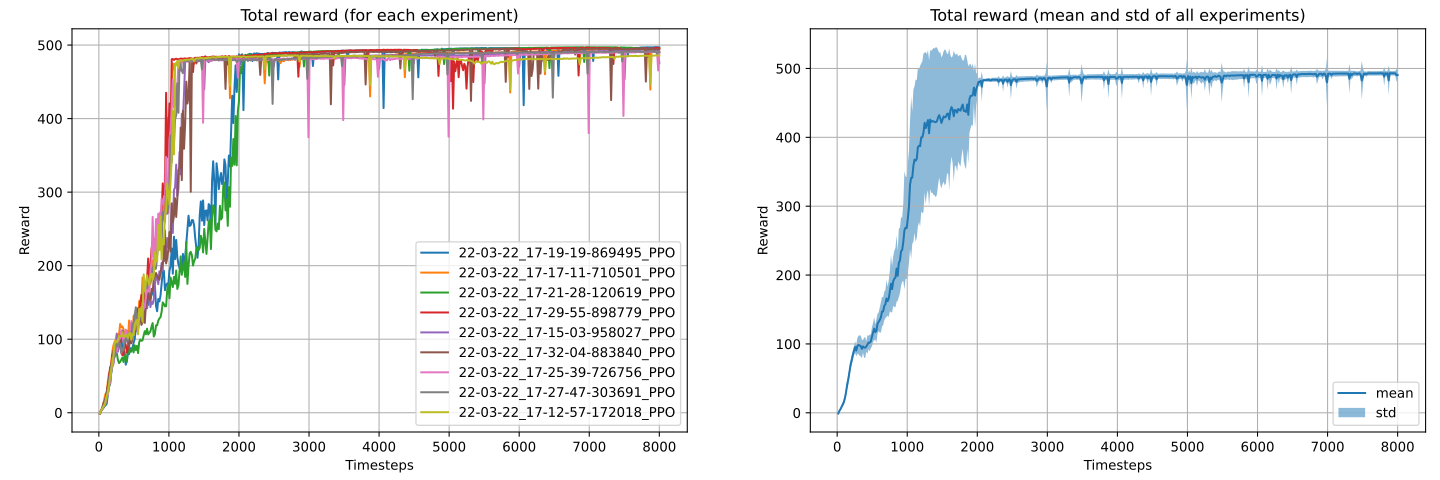
Example generated by the code showing the total reward (left) and the mean and standard deviation (right)
of all experiments located in the runs folder.
Script: tensorboard_file_iterator.py
Note
The code will load all the TensorBoard files of the experiments located in the runs folder.
It is necessary to adjust the iterator’s parameters for other paths.
import matplotlib.pyplot as plt

import numpy as np

from skrl.utils import postprocessing


labels = []
rewards = []

# load the TensorBoard files and iterate over them (tag: "Reward / Total reward (mean)")
tensorboard_iterator = postprocessing.TensorboardFileIterator(
    "runs/*/events.out.tfevents.*", tags=["Reward / Total reward (mean)"]
)
for dirname, data in tensorboard_iterator:
    rewards.append(data["Reward / Total reward (mean)"])
    labels.append(dirname)

# convert to numpy arrays and compute mean and std
rewards = np.array(rewards)
mean = np.mean(rewards[:, :, 1], axis=0)
std = np.std(rewards[:, :, 1], axis=0)

# create two subplots (one for each reward and one for the mean)
fig, ax = plt.subplots(1, 2, figsize=(15, 5))

# plot the rewards for each experiment
for reward, label in zip(rewards, labels):
    ax[0].plot(reward[:, 0], reward[:, 1], label=label)

ax[0].set_title("Total reward (for each experiment)")
ax[0].set_xlabel("Timesteps")
ax[0].set_ylabel("Reward")
ax[0].grid(True)
ax[0].legend()

# plot the mean and std (across experiments)
ax[1].fill_between(rewards[0, :, 0], mean - std, mean + std, alpha=0.5, label="std")
ax[1].plot(rewards[0, :, 0], mean, label="mean")

ax[1].set_title("Total reward (mean and std of all experiments)")
ax[1].set_xlabel("Timesteps")
ax[1].set_ylabel("Reward")
ax[1].grid(True)
ax[1].legend()

# show and save the figure
plt.show()
plt.savefig("total_reward.png")